



TL;DR
- What it is: An AI Overview tracker is a log. One row is one Google query, checked on one date, from one location, on one device.
- What to record: Seven fields: query, date, location, device, whether an AI Overview shows, the cited URLs, and your position in that list.
- Why you repeat the check: In a 2025 Ahrefs study, 45.5% of the cited URLs were new from one observation to the next.
- How to build it: Three tabs and three formulas in a free spreadsheet.
- How to pick a tool: Match your situation to a free check, an SEO suite, a dedicated tracker, or a multi-engine report.
Does AI name your brand? Check your site.
An AI Overview tracker is a log. For a fixed list of Google queries, it records on each date whether Google shows an AI Overview and which pages the Overview cites. You can keep one in a spreadsheet for free, or buy a tool that runs the checks.
One check is not enough. Ahrefs measured that 45.5% of the cited URLs were new from one observation of an AI Overview to the next (Ahrefs, November 2025). A tracker needs the same queries, the same place and device, and more than one check.
Below: the seven fields, a spreadsheet build with three formulas, what Search Console adds, and a table that matches your situation to a tool. For referral traffic and for what to change on your site, read how to track Google AI Overviews.
What an AI Overview tracker is
It is a table of observations. One row is one check: this query, on this date, from this country, on this device. The row says whether an AI Overview appeared and which URLs it linked to.
An AI Overview checker looks once. A tracker keeps the log. Track My Visibility says that its own free report is a snapshot and that paid tracking checks on a schedule, so you can see the trend.
A classic rank tracker stores one position for each keyword. That is not enough here, for three reasons.
There is no rank to store. Google gives each link in an AI Overview the same position, as Search Console counts it. So the position number cannot tell you whether you are the first source or the last. Store two other things: are you in the box, and where in its source list.
Absence has two meanings. "No AI Overview on this query" and "an AI Overview that cites other sites" need different fixes. Google says that AI Overviews show only when its systems judge them additive to classic Search, so they often do not trigger (Google Search Central). Keep the two cases apart.
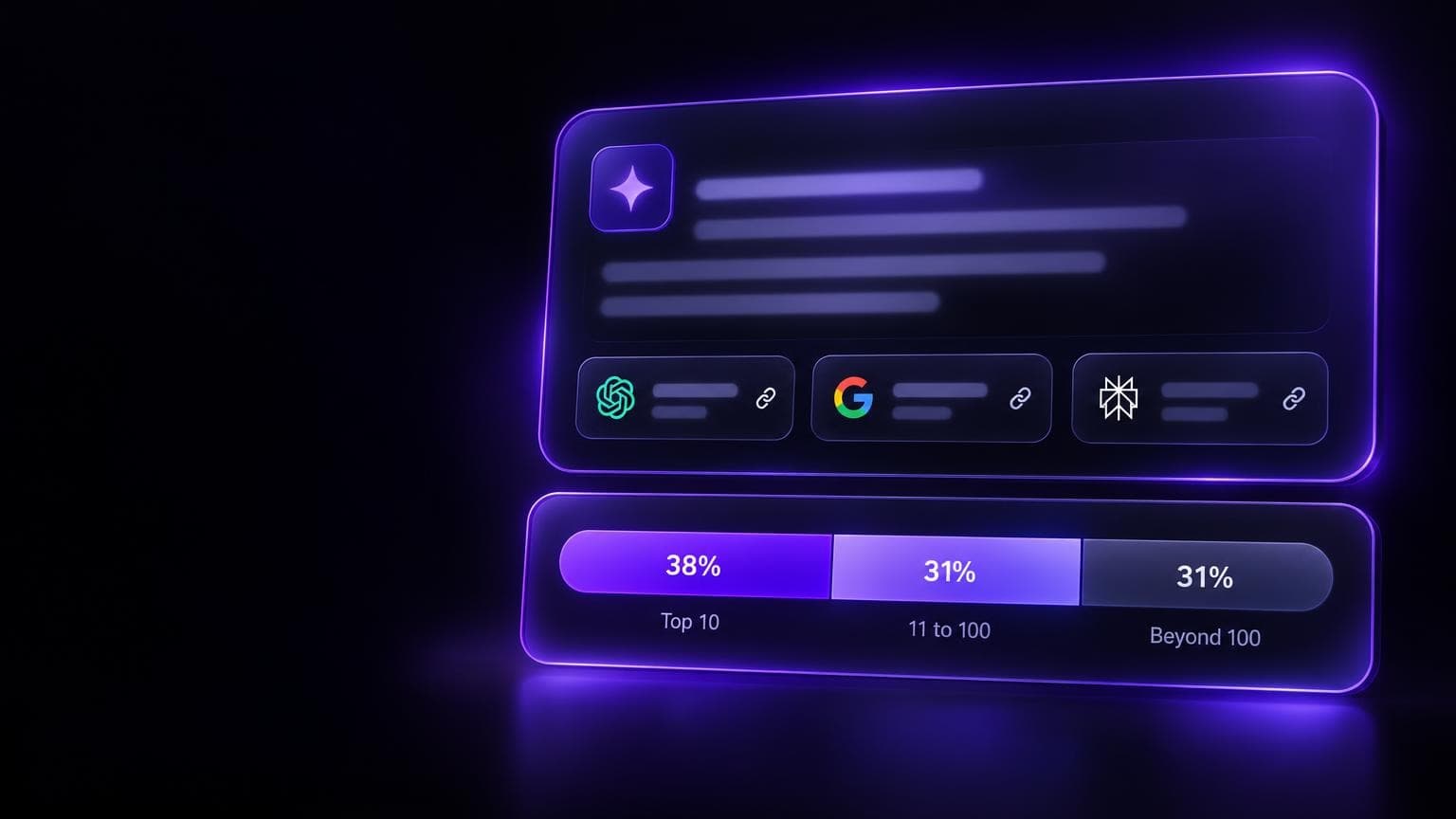
A page-one rank is not a citation. In March 2026 Ahrefs published an analysis of 863,000 keyword SERPs and 4 million AI Overview URLs. 37.9% of the cited URLs also appeared within the first 10 blocks of the results page for the same query, and 31.0% were beyond the first 100. Ads, featured snippets, and other SERP features count as blocks. Its July 2025 study found about 76% in the top 10, but Ahrefs has since improved its parser, so the figures are not a clean comparison. The citation needs its own column.
A real stored AI Overview
AI SEO Tracker's public leaderboard scanned the question best SEO tool on 24 September 2026. Its stored Google AI Overview shows why the fields below exist.
- The answer names seven products: Semrush, Ahrefs, SE Ranking, Screaming Frog, Surfer, Mangools, and Google Search Console.
- It lists 6 sources: a Gartner Peer Insights page, clarorank.com, Zapier, OneLittleWeb, and two YouTube videos.
- None of the six sources is the site of one of the seven products. The brands were named. None was a listed source.
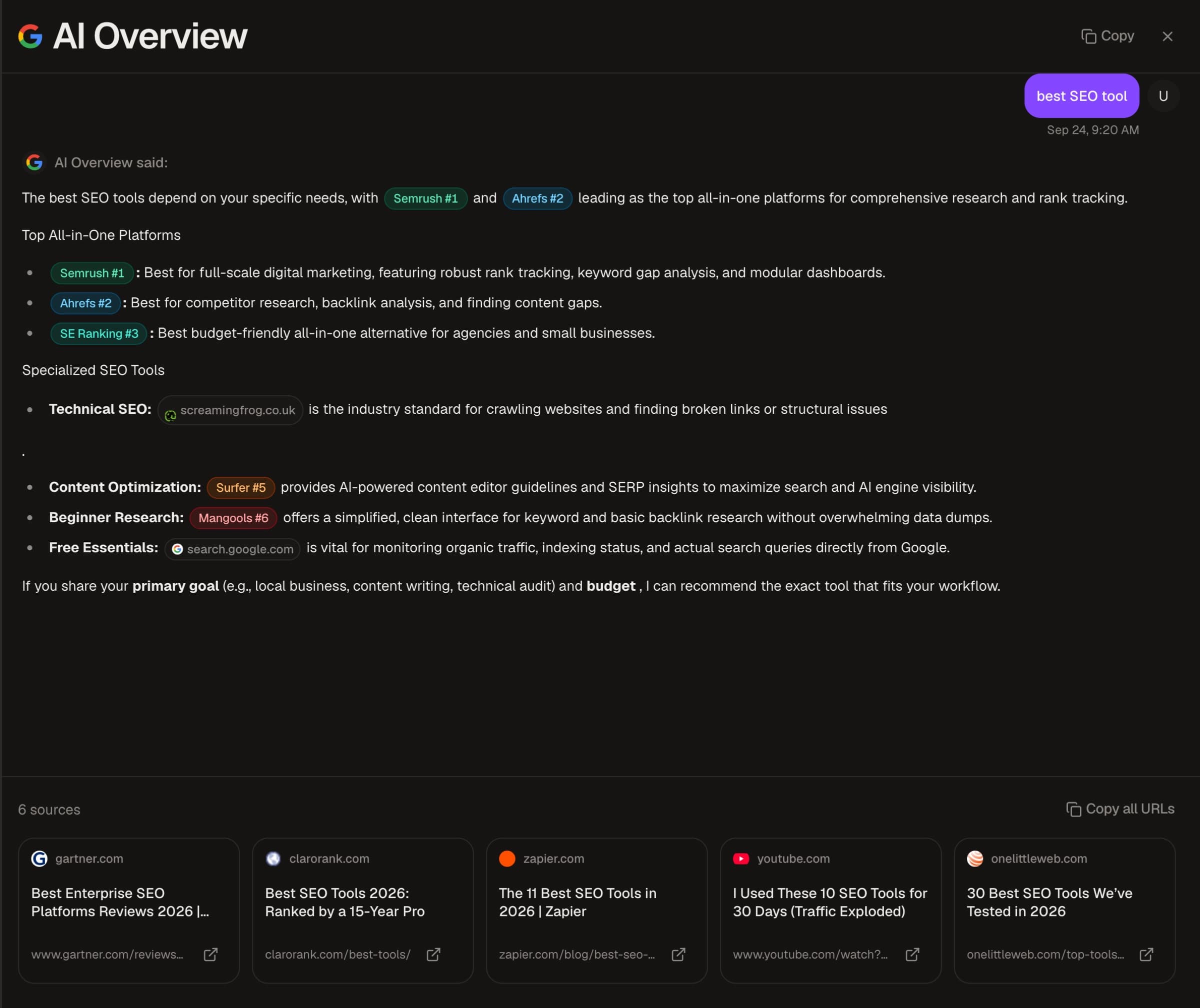
That is the gap between a brand named in the text and a URL cited as a source. Two product names in the text, Screaming Frog and Google Search Console, do link to those products' own sites. Neither site is in the source list. The two YouTube sources are different videos, so a tracker that stores domains alone would merge them.
This is one question, scanned once. The leaderboard is a monthly snapshot, not a tracker log. The example shows what to log. It is not a trend.
The seven fields to record
| Field | What to write | Why you need it |
|---|---|---|
| Query | The exact text. Do not change it from week to week. | A reworded query is a different query. |
| Date | The day of the check | Cited pages rotate. No date, no history. |
| Location | Country and language. Add the city for local queries. | Google lists the countries and languages where AI Overviews are available. Record the market that you checked. |
| Device | Desktop or mobile | Google's AI report in Search Console splits the data by device. Compare desktop with desktop. |
| AI Overview shown | Y or N | This separates "no box" from "a box without you". |
| Cited URLs | Each source link, in the order shown | This shows which sites Google uses when it does not use you. |
| Your position | Your place in the source list, and which of your URLs. Leave it empty if you are not cited. | You can see a slide from first source to last before you drop out. |
Store the whole list, not the first link. In Pew Research Center's 2025 data, 88% of the AI summaries cited three or more sources.
As far as I can tell, Google's documentation does not say what the order of the source links means. Treat the position as an observation, not as a rank. Record it anyway. It costs one cell.
Two more columns are optional, and I would add both:
- Brand named in the text. A citation is a link to your page. A mention is your name in the generated answer. You can have one without the other, and the two are different metrics.
- Screenshot. A link to a saved image of the Overview. When a number looks wrong three weeks later, the screenshot settles the question.
Why one check is noise
Three things can change the result while your site stays the same.
The box is not always there
Google decides when an AI Overview shows. Its documentation says they often do not trigger, and it gives no list of triggers. Pew's data shows the pattern: longer, question-shaped searches trigger more often.
Pew Research Center re-ran 68,879 Google searches that 900 US adults made in March 2025. The re-run was in April 2025, and 18% of the searches produced an AI summary. The rate was 8% for searches of one or two words and 53% for searches of ten words or more. Of the searches that began with a question word, 60% produced one.
The levels are from 2025, so treat them as dated. The useful part is the pattern: the mix of your query list sets your trigger rate, so compare the rate only with the rate for the same list.
The cited pages rotate
Ahrefs studied more than 43,000 keywords, each with at least 16 recorded AI Overviews over one month. An Overview had a 70% chance of changing from one observation to the next. Between two consecutive observations, 45.5% of the cited URLs were new, on average. The meaning stayed almost the same: the average cosine similarity between consecutive answers was 0.95, where 1.0 is a perfect match.
Ahrefs shows the effect with the query "renters insurance". Two AI Overviews captured two minutes apart in incognito mode had different wording and content. The study also measured an average persistence of 2.15 days. Ahrefs notes that its checks were not daily, so the real citation change rate is likely much higher.
So the answer stays and the sources change. One "cited" or "not cited" is weak evidence. Check the same query several times and report a share, such as "cited in 3 of 4 checks".
Location and device
Ahrefs says Google personalizes results by location, search history, and other factors, so you can see an AI Overview while someone else does not (Ahrefs, January 2026). I know of no public figure for how much the same query differs between two cities, or between a phone and a desktop. So hold both fixed. If you change either one in the middle of a month, you start a new series.
Four rules that cut the noise
- Freeze the query list for at least a month.
- Use one location and one device for each series.
- Check each query more than once in a period, and report a share, not a yes or a no.
- Keep "no AI Overview" apart from "not cited".
I know of no public study that gives the number of checks that is enough. My floor is one check a week on the same weekday. That shows a trend, not an event: with an average persistence of 2.15 days, an Overview can change more than once between two weekly checks.

Build the tracker in a spreadsheet
Use Google Sheets with three tabs. Google says that anyone with a Google Account can create in Sheets.
Tab 1: Queries
Columns: query, intent tag (question, comparison, product, brand), target URL, date added. The target URL is the page that you want Google to cite for that query.
Start with 30 to 50 queries. Take them from the Search Console query report and from the questions that buyers ask your sales and support people. Include question queries, because 60% of the Pew searches that began with a question word showed an AI summary. Add your product terms and brand name too, even if an Overview is rare there.
Tab 2: Checks
One row for each check. This tab is the log, and it only grows.
| Column | Field | Example |
|---|---|---|
| A | Date | 2026-10-02 |
| B | Query | best crm for a small agency |
| C | Location | US, English |
| D | Device | Desktop |
| E | AI Overview shown | Y |
| F | You are cited | N |
| G | Your position | (empty) |
| H | Your cited URL | (empty) |
| I | Cited URLs | Each source link, in order |
| J | Brand named | N |
| K | Screenshot | Link to the saved image |
To run a check:
- Use the same setup each time: the same browser, country, device type, and signed-in state. A private window helps.
- Search the query exactly as it is written in Tab 1.
- If there is no AI Overview, write N in column E and go to the next query.
- If there is one, expand it until all its source links show. Copy each source link once into column I, in order. Write Y or N in column F. If you are cited, write your place in column G and your URL in column H.
- Save a screenshot and put its link in column K.
Tab 3: Summary
Three formulas do most of the work.
Trigger rate, the share of checks where an Overview showed:
=COUNTIF(Checks!E2:E,"Y")/COUNTA(Checks!E2:E)
Citation rate, the share of those Overviews that cited you:
=COUNTIF(Checks!F2:F,"Y")/COUNTIF(Checks!E2:E,"Y")
The result for one query. Put the queries in column A of this tab and fill the formula down:
=IFERROR(COUNTIFS(Checks!B2:B,A2,Checks!F2:F,"Y")/COUNTIFS(Checks!B2:B,A2,Checks!E2:E,"Y"),"no overview")
For a weekly trend, add a column L to the Checks tab with =ISOWEEKNUM(A2). Then build a pivot table with the week in the columns.
Here is what the third formula returns for three queries with four checks each. Example numbers, not data from a real site.
| Query (4 checks each) | What the checks showed | The third formula returns |
|---|---|---|
| best crm for a small agency | Overview in 4 checks, you cited in 3 | 75% |
| crm pricing | No Overview in any check | no overview |
| how to migrate crm data | Overview in 4 checks, you cited in 0 | 0% |
The formula gives each query one of three states:
- "no overview": Google did not show the box in any check. There is nothing to win on this query now. Keep it in the list and look again next month.
- 0%: The box shows and it uses other sites. Open column I and read which sites. This is your work list.
- Above 0%: You are in the rotation. A query at 4 of 4 is stable. A query at 1 of 4 is not.
With four checks, one check is 25 points. Do not react to a move of one check.
The tracking guide covers what to do with the log. For the content work, see how to get cited in Google AI Overviews.
Fill the sheet with a SERP API
A SERP API can fill columns E and I. A script sends each query with a location and a device, and writes the response into the Checks tab.
SerpApi is one example. Its Google Search API takes a location and a device parameter. It returns an ai_overview object with a references list: a title, link, snippet, source, and index for each reference. That list is your column I.
Two details matter for a log. Google sometimes returns the Overview through a second request, and the page_token expires within 1 minute, so make that call at once. And SerpApi serves a cached copy of an identical search made within the last hour, unless you set no_cache to true. A cached copy is not a new check.
I have not benchmarked SERP APIs against each other. Read the vendor's documentation for location, language, and device parameters before you pay.
Where the sheet stops
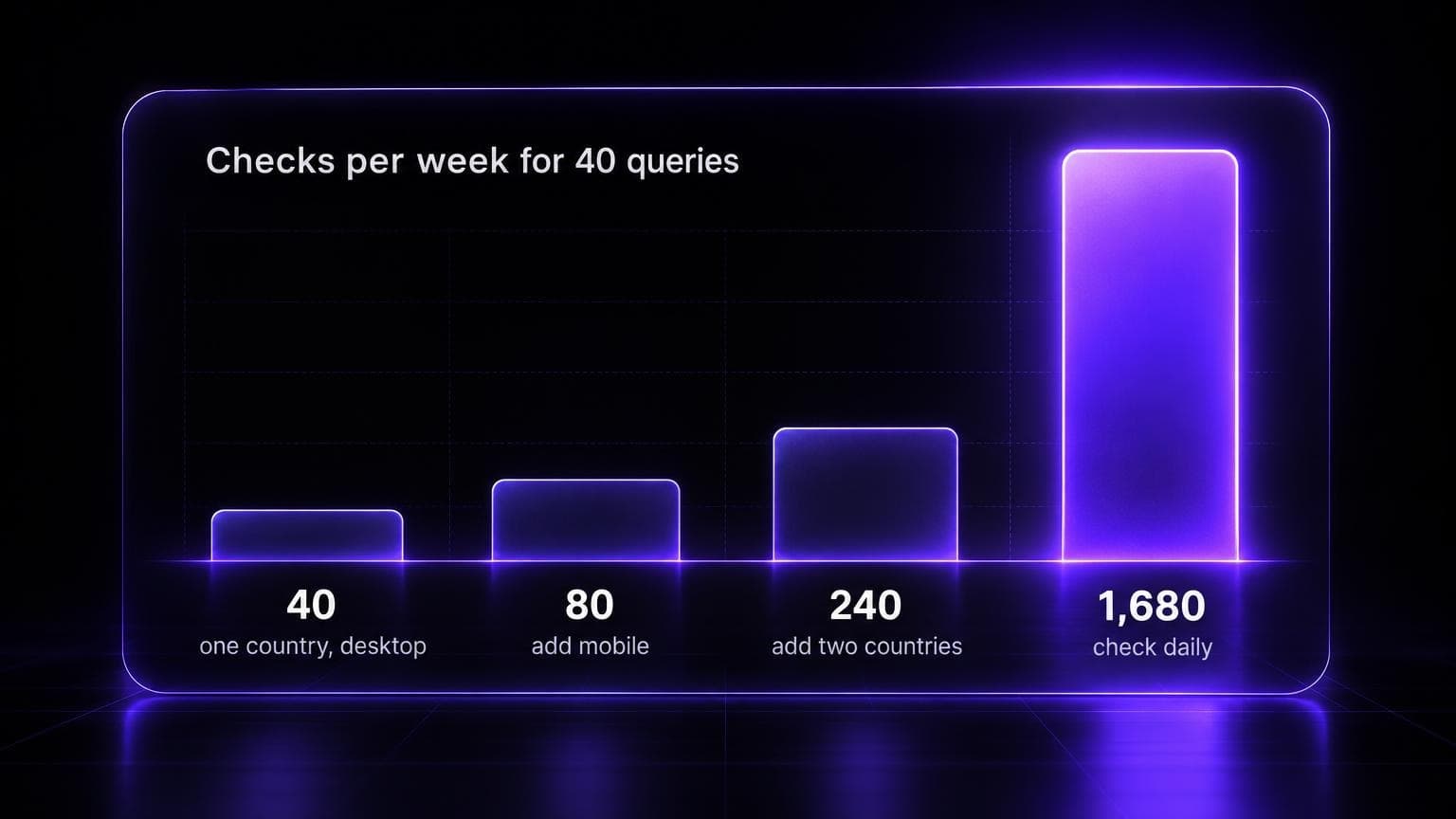
The arithmetic decides it. Forty queries, one location, one device, one check a week: 40 checks. Add mobile: 80. Add two more countries: 240. Make the checks daily: 1,680 a week. The first number is a routine. The last number is not a job for a person.
What Search Console adds
Search Console is the first-party half of the tracker. Google launched the Search Generative AI performance reports on 3 June 2026 for a subset of sites. A note on that post says that, as of 31 August 2026, Google has rolled the insights out to all websites worldwide. The help page lists too few impressions in AI features as one reason that a site does not see the report.
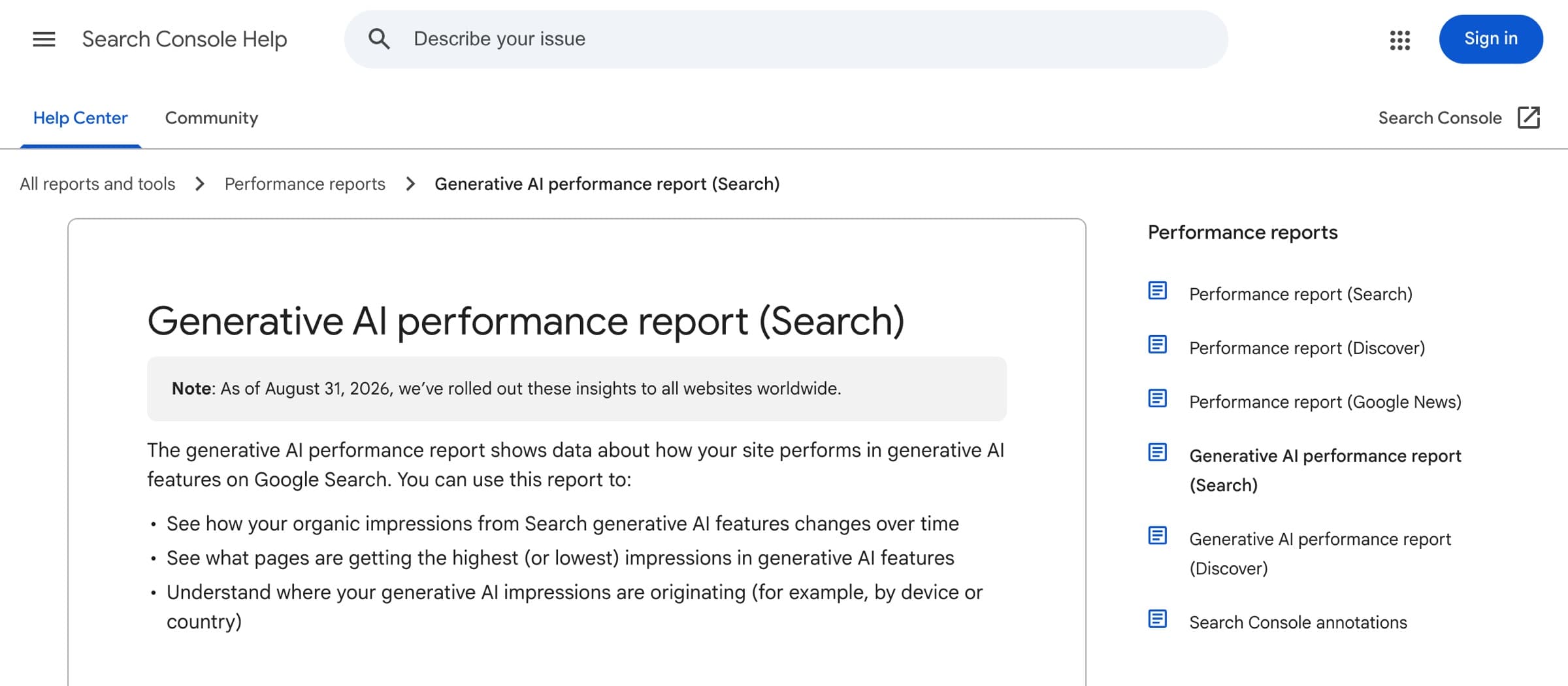
The report shows impressions: how often links to your site appeared in AI Overviews and AI Mode. You can group the impressions by page, country, device, and date, and export the table. The help page lists no query dimension, and none of the dimensions splits Overviews from AI Mode.
So Search Console shows which of your pages Google puts in AI features, and how often. It does not show the query, or which site was cited when you were not. The spreadsheet answers those two.
Once a month, write the AI impressions for each target URL next to its row in the Summary tab. The numbers will not match the sheet: the report includes AI Mode, and it counts all searches, not only your 30 to 50 queries. The tracking guide has more on these reports.
When to buy a tool
An AI Overview tracking tool is the same table with the checks done for you. Buy one when one of these is true:
- You skip weeks. A log with gaps is worse than a smaller log with none.
- You need more than one location or device. Each one multiplies the checks.
- You need competitor history. Column I holds each cited URL. Nobody reads a quarter of those cells by hand to find which domain gained citations.
- You need more than Google. If your buyers also ask ChatGPT, Perplexity, Gemini, or Copilot, each engine needs its own log. Five engines is five times the work.
Stay with the sheet when the list is short, the market is one country, and a weekly check is enough to steer your content work.
There are two kinds of tool. Rank trackers and SEO suites that added AI Overview data show it next to the keyword data you already have. They fit if you already pay for one. See the rank tracking tools comparison. AI visibility trackers run a list of prompts on several answer engines, with AI Overviews as one of them. See software for monitoring AI search mentions and the tracker comparison.
Pick a tool by your situation
I have not tested these tools. The table says what each vendor's page said on 2 October 2026. Terms change, so confirm them on the vendor site.
| Situation | Option | What to know |
|---|---|---|
| A one-off look at a few queries | SE Ranking free check, Track My Visibility free report | SE Ranking's page offers a free check of 5 keywords, on desktop or mobile. Track My Visibility says its free report is a snapshot. |
| A free log that you keep yourself | The sheet in this post | You run the checks. It fits one market and 30 to 50 queries. |
| An SEO suite that you already pay for | Ahrefs, Seobility | Ahrefs shows AI Overview citations for a domain in Site Explorer. Seobility shows, for each keyword, the full Overview text, the cited websites in order, and whether you are included. It has a 14-day free trial. |
| A dedicated Google AI Overview tracker | Keyword.com, AIclicks, OmniSEO | Keyword.com keeps an HTML snapshot with each result and has a 14-day trial. AIclicks says it checks each keyword every 24 hours and has a 3-day trial. OmniSEO says it checks daily and starts free for 7 days. |
| A market view, not your own queries | PAN B2B dashboard | An interactive dashboard of how often AI Overviews appear across 5,000+ B2B keywords, by intent and funnel stage. |
| Your brand across five answer engines | AI SEO Tracker (my product) | $49 one time. It scans ChatGPT, Perplexity, Gemini, Copilot, and Google AI Overviews. Details are below. |
Questions to ask before you pay
Hold each tool to the seven fields. Omnia, a vendor, suggests the questions on re-runs and changed answers in its comparison guide. Read it as a vendor's view. The questions apply to any tool.
- Does it store the cited URLs for each check, in order, or only a flag that an Overview exists?
- Can you set the location and the device, and does each result show them?
- How often does it re-run each query? Can you see each check, or only an average?
- Does it flag when the answer changed between two checks?
- Does it keep proof, such as a snapshot with a timestamp?
- Can you export the raw rows?
- Is the free version a one-time look, or a log?
Where AI SEO Tracker fits
AI SEO Tracker is the second kind. It is my product, so weigh this paragraph with that in mind. The report costs $49, one time. You enter your website and confirm up to 50 prompts that it writes from your site. It scans ChatGPT, Perplexity, Gemini, Copilot, and Google AI Overviews daily for 7 days. You get mentions, citations, your position in the answer, the sources that each engine cited, competitor visibility gaps, and a prioritized action plan. You keep read, print, and export access to the results. There is no free scan. Weekly reports are available for tracking after the 7 days.
It scans Google AI Overviews. It does not scan Google AI Mode.
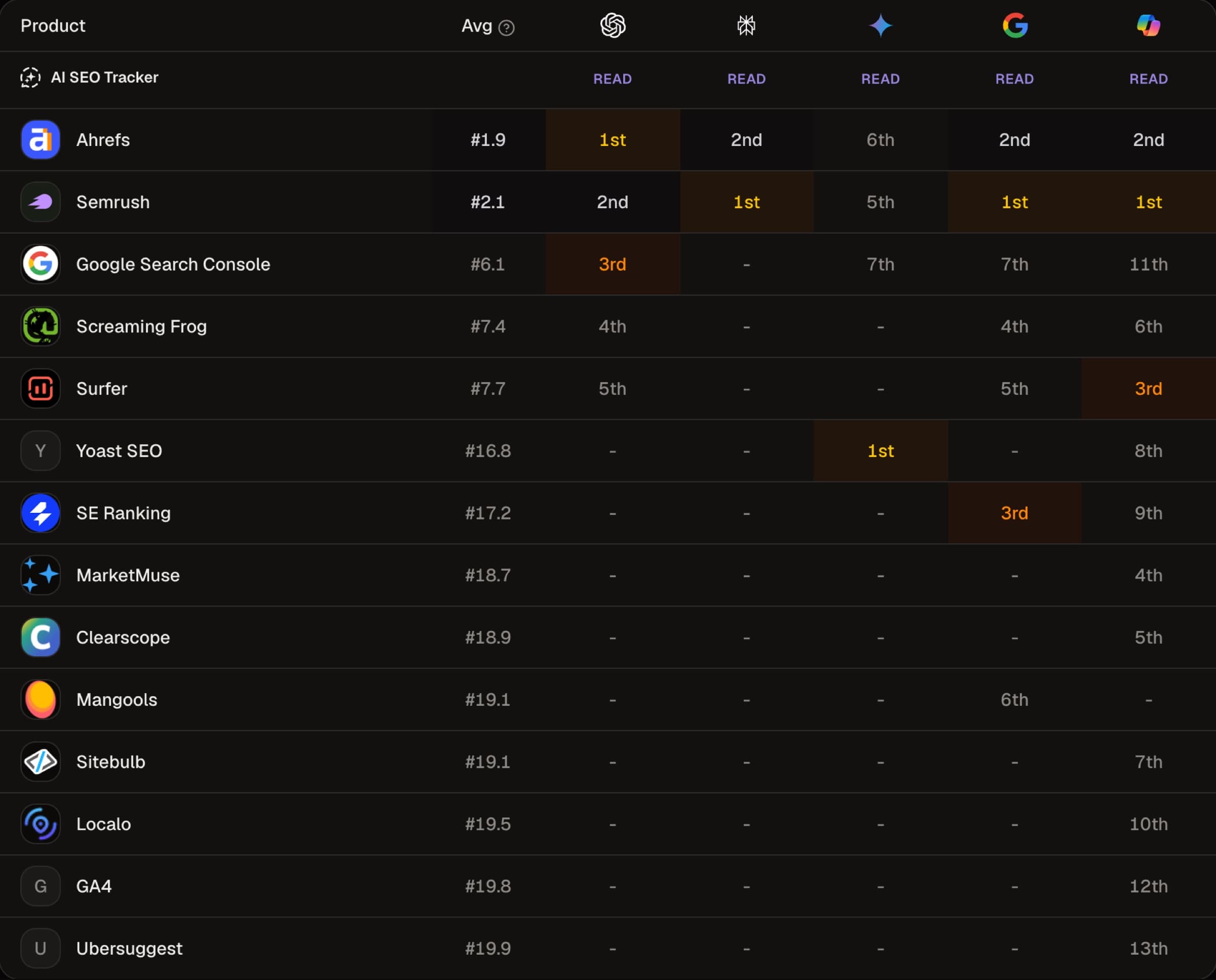
The leaderboard scan used above shows why one engine is not enough. For best SEO tool, Semrush ranked 1st in the Google AI Overview, Perplexity, and Copilot, and 5th in Gemini. Ahrefs ranked 1st in ChatGPT and 6th in Gemini. The AI Overview named 7 of the 14 products that the five engines named in total. A log for Google tells you nothing about the other four.
Start with the sheet. Freeze the queries, fix the location and the device, and check more than once before you trust a number.