

 ChatGPT
 Perplexity
 Claude
 Grok
GrokThis playbook comes straight from our AI SEO course.
Get the full course →
AI search engines are changing how people find information online, but tracking their impact has been a challenge, until now.

Does AI name you?
See if AI mentions your brand. Then get the pages to fix.
Why AI search traffic is different
While ChatGPT Search, Perplexity, Gemini, and Copilot don't identify themselves with specific user agents in Google Search Console, there's a clever workaround to spot their queries based on distinctive search patterns.
How to spot AI search queries in Google Search Console
AI search engines leave fingerprints. While humans type "best CRM software," AI engines ask "comprehensive analysis of CRM software solutions with implementation timelines, pricing tiers, and integration capabilities for mid-market companies in 2024."
Here's how to spot them:
1. They ask everything at once Humans search in steps. AI gathers everything in one shot, creating queries that sound like research briefs instead of questions.
2. They follow research patterns AI engines are methodical. They check:
- Time frames ("last 24 months", "since 2023")
- Current status ("currently developing", "latest updates")
- Future plans ("roadmap", "upcoming features")
- Competitive landscape ("market position", "versus competitors")
3. They use business speak AI queries sound like they came from a consulting deck—full of terms real users rarely type.
Thanks to StoryChief for sharing their data. Here are actual AI search queries found in Google Search Console:
Step 1: Open Google Search Console
Here's the step-by-step process to identify AI search traffic:
- Open Google Search Console - Go to search.google.com/search-console and select your property
- Navigate to Performance → Search results - This shows you all the queries people used to find your site
- Sort queries by ascending impressions - Click the "Impressions" column header twice to sort from lowest to highest
- Focus on queries with 1-10 impressions (some may go up to 50) - These low-impression queries often indicate AI engine research patterns
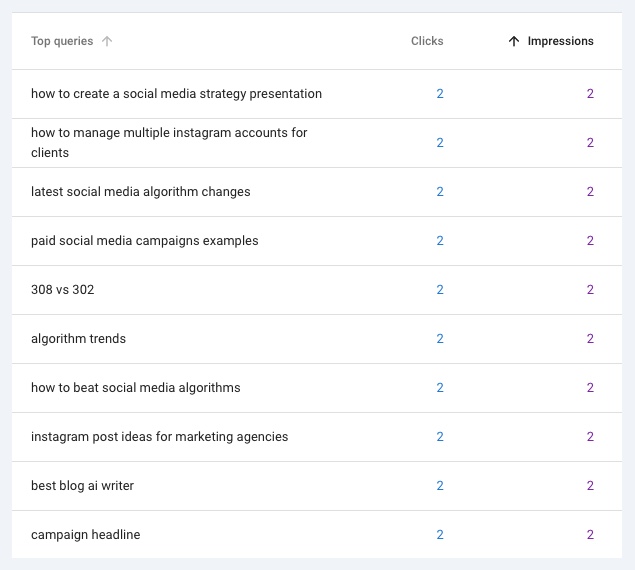
Step 2: Use the "Query Contains" filter
Use the "Query Contains" filter with these keywords to find AI-style queries:
Query Contains: "task"
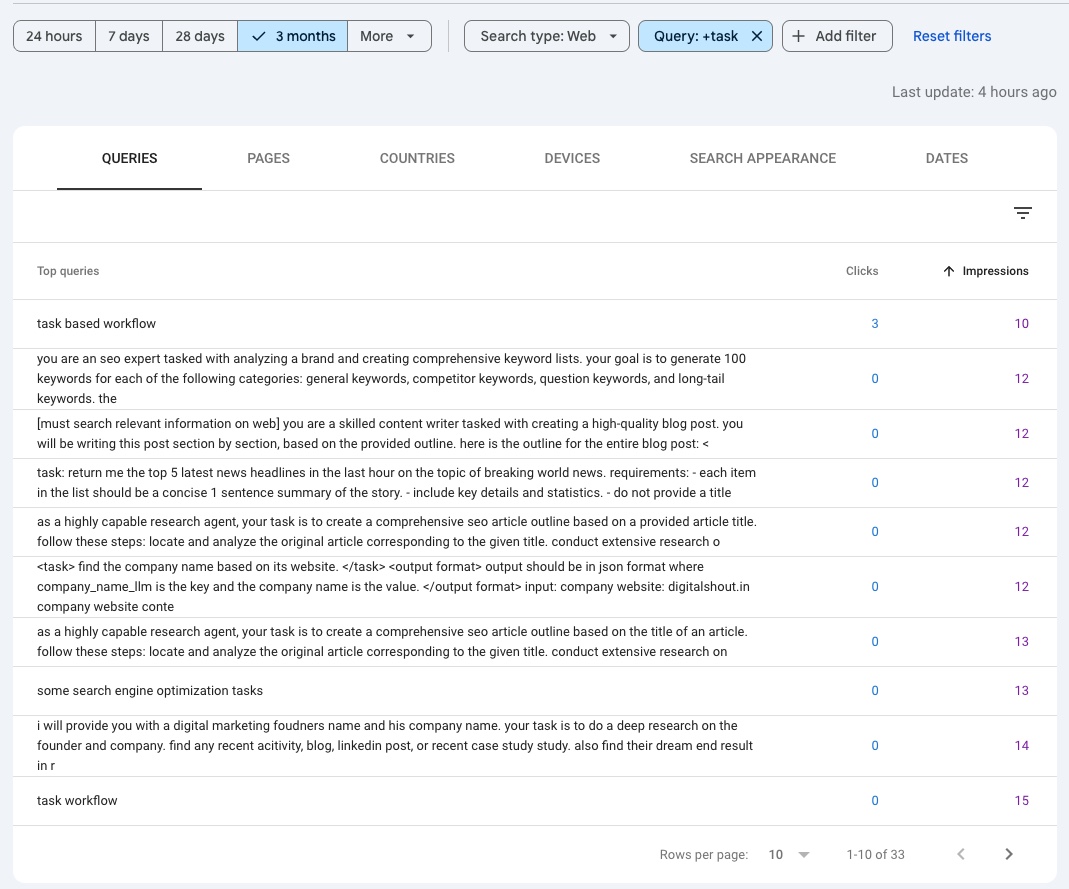
This StoryChief screenshot shows the "task" filter in action. See those long, instruction-like queries?
That's AI at work.
Real people don't type "you are an seo expert tasked with analyzing a brand and creating comprehensive keyword lists...", but AI engines do.
These detailed, structured queries are dead giveaways of AI search activity.
Query Contains: "latest"
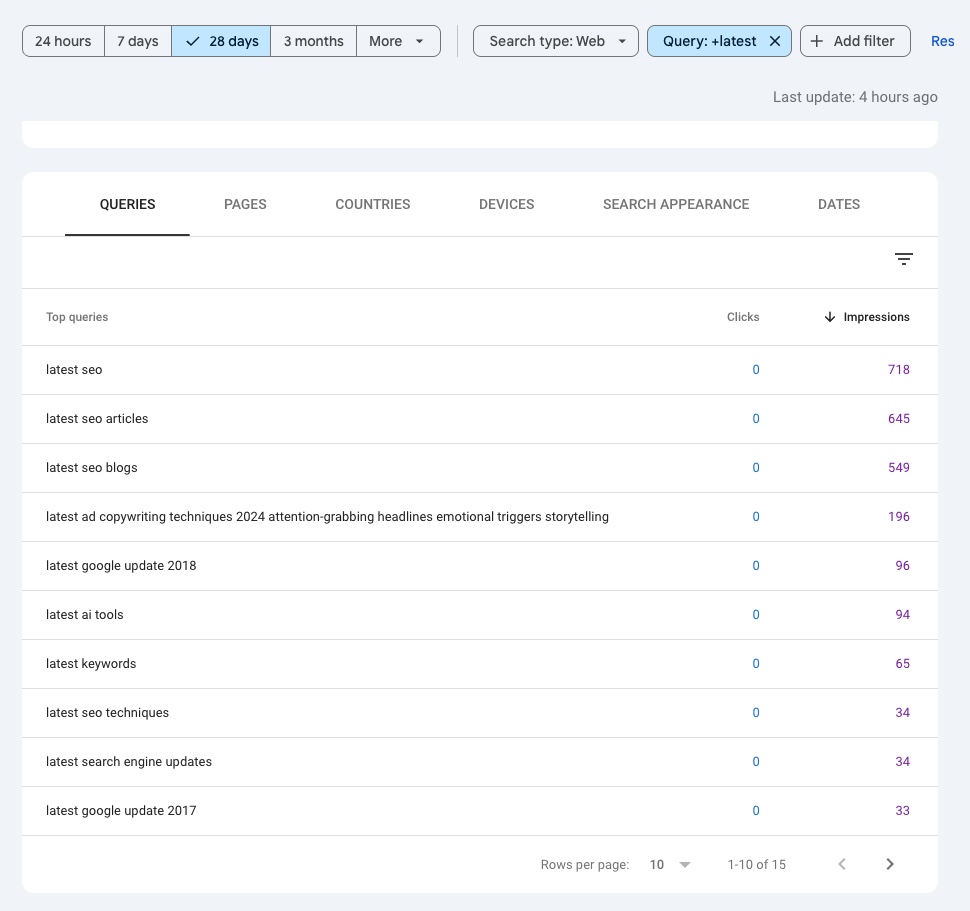
StoryChief filtered for "latest" and found something telling: ultra-specific queries like "latest ad copywriting techniques 2024 attention-grabbing headlines emotional triggers storytelling."
That's 12 words packed into one search. Real people don't search like this, they'd type "copywriting tips" or "ad headlines that work".
But AI engines search systematically, cramming multiple concepts into detailed research queries.
Filter for "latest" in your own Search Console. You'll spot the AI traffic immediately it's the queries that sound like research briefs, not human searches.
Query Contains: "2025"
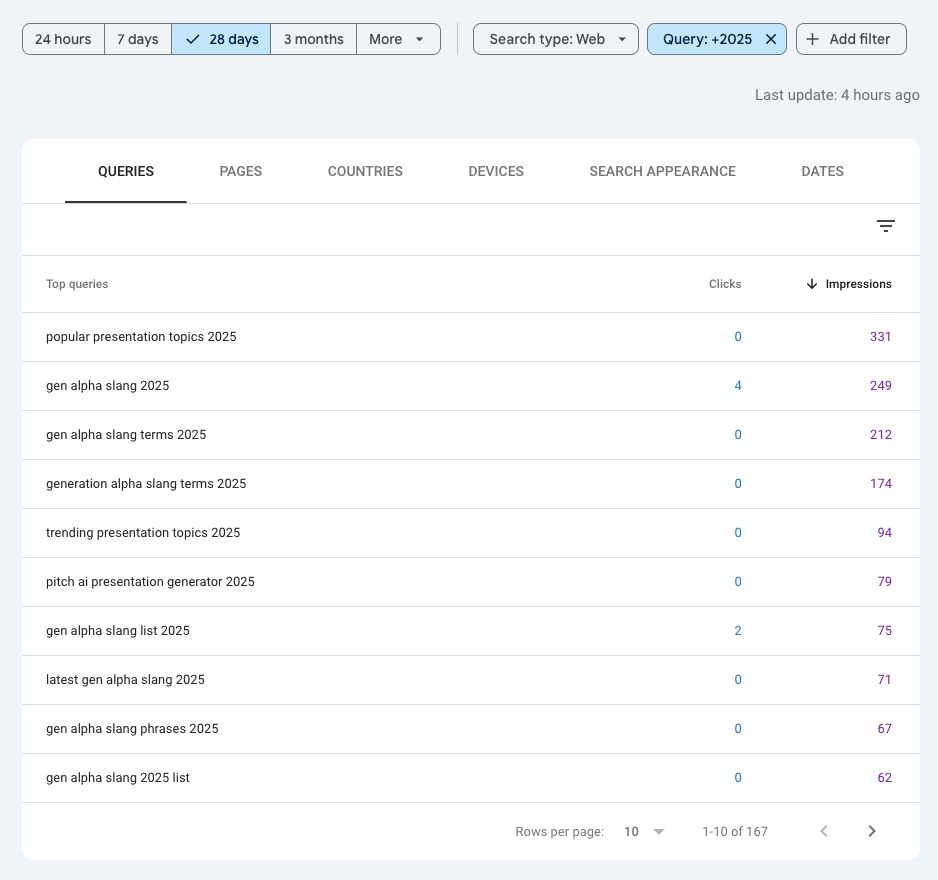
Notice how AI-driven queries often combine a specific year with niche or emerging topics, like "gen alpha slang 2025" or "popular presentation topics 2025".
These queries are typically longer, more structured, and clearly part of a "Deep Research" task that LLMs like o3, Grok or Perplexity are doing.
Filtering by a year (e.g., 2025) quickly surfaces these multi-part, forward-looking queries that real users rarely type.
Step 3: Use regex filters to catch AI patterns
Now we'll use Google Search Console's regex filters to catch AI queries by their distinctive patterns. These patterns work because AI engines consistently use specific language structures that humans rarely type.
Apply these filters one at a time in the "Custom (regex)" option in Google Search Console.
New to regex patterns?
These patterns use regular expressions to match complex query structures. In Google Search Console, you can use regex filters by selecting "Custom (regex)" in the Query filter dropdown. Common patterns include:
.- matches any single character{n,}- matches n or more occurrences|- OR operator (e.g.,January|February).*- matches any string of characters
Learn more about regex syntax in Google Search Console.
For example, here's a regex pattern to catch queries that mention specific months:
(January|February|March|April|May|June|July|August|September|October|November|December)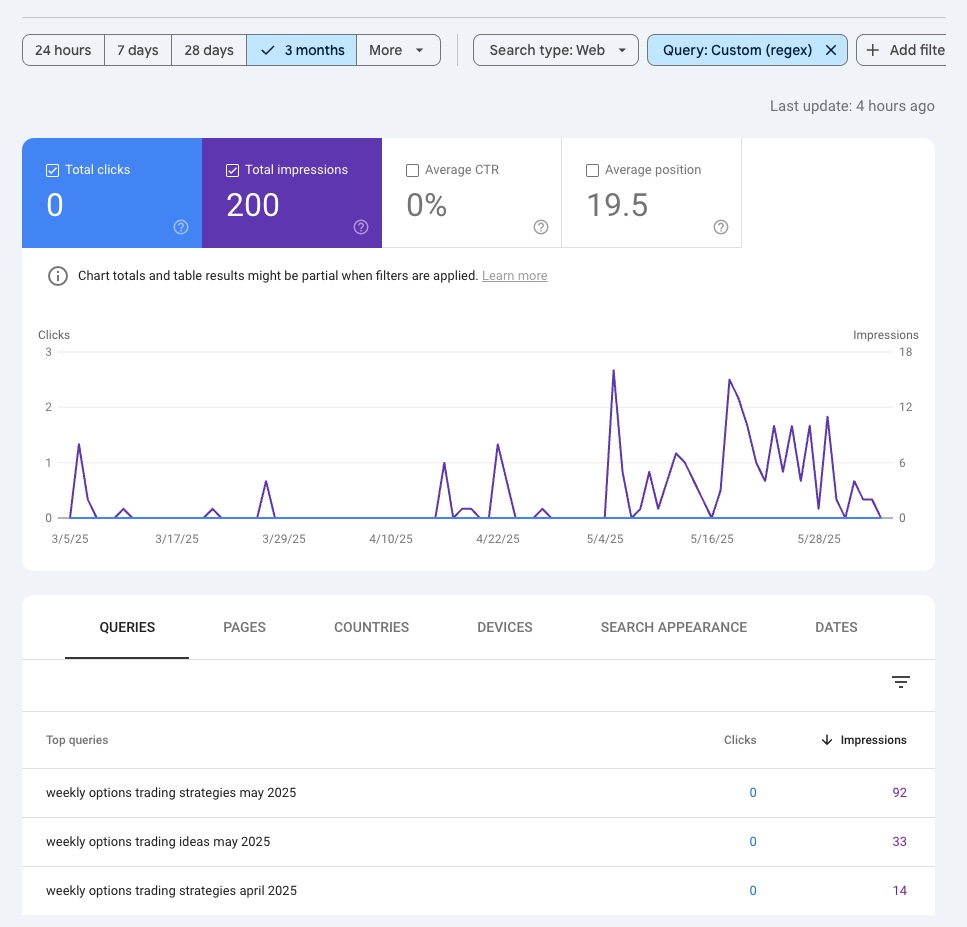
Here's a perfect example from a 1:1 consulting session with our Pro plan user tradervue.com.
See "weekly options trading strategies may 2024"? That's AI doing research, not humans.
We caught this with regex filters. Month names = AI giveaway.
While everyone else chased "options strategies," our client built content for how AI actually searches and is now getting more traffic from AI engines.
The ultimate regex: Find AI queries in seconds
After teaching this in our AI SEO course, students keep asking for the "ultimate AI detection regex."
Look, I'm going to save you an hour of pattern matching, here it is:
.{75,}
Any query over 75 characters, that's your 80/20 rule for AI detection.
Try this right now:
- Go to your Google Search Console
- Add a Custom (regex) filter
- Enter:
.{75,} - Sort by impressions (ascending)
Those low-impression, novel-length queries? That's AI researching your market.
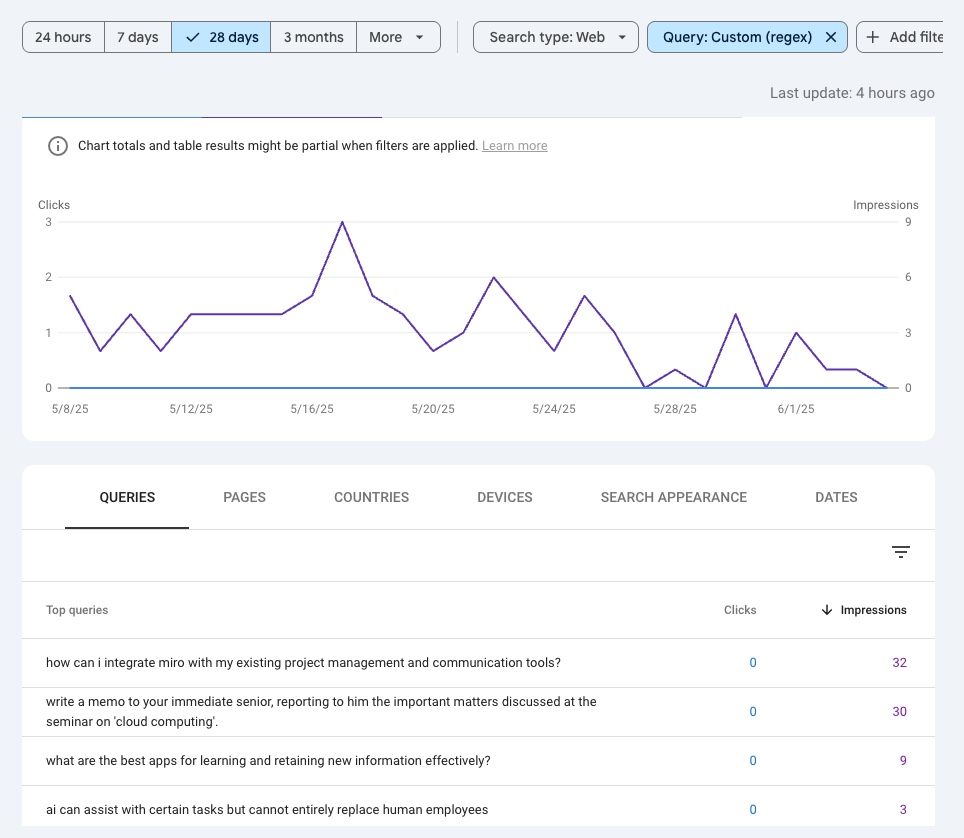
Zero clicks on 135 impressions? That's not a CTR problem. That's AI doing research without sending traffic. This example from our client voicenotes.com shows the game isn't getting clicks anymore. It's getting cited.
The pattern behind the pattern: Each 75+ character query is actually 3-5 traditional searches compressed into one. AI is speed-running your customer's research journey.
What used to be:
- "best crm" →
- "crm pricing" →
- "crm implementation time" →
- "salesforce vs hubspot"
Now it's: "give me the best crm software for mid-market b2b companies with pricing if I want to implement it next month"
Want to see what this means for your strategy? We break it all down in our complete AI SEO course.
The future of search is AI. Are you ready?
The game has changed. Google spent 20 years training us to write for algorithms. Now we need to write for systems that actually understand context.
Your GSC data is showing you the questions.
But are you giving AI the answers it needs to recommend you?
Track what actually matters
GSC shows you the shadows. AISEOTRACKER shows you the full picture, what every major AI engine says about you, your competitors, and your market.
Get your AI SEO report →Free scan. No regex required (we promise)
It's not just about GSC
Most people will read this guide, set up some filters, feel smart for a day, then do nothing.
The winners will:
- Find their AI visibility gaps, know exactly where you're missing from AI answers
- Ship content that fills those gaps, create what AI engines actually want to recommend
- Track if it's working, see your AI visibility improve in real-time
- Iterate faster than everyone else, get prioritized action plans, not just graphs
Unlike generic AI tracking tools, AISEOTRACKER gives you the same insights we use for our agency clients who've grown hundreds of SaaS companies. Get your free scan today!