

TL;DR
- What it reads: The text in your HTML. In short windows. Not the whole page.
- JavaScript is unsettled: Vercel says no. One site owner says maybe. OpenAI says nothing.
- Five checks: robots.txt, raw HTML, the bot user agent, Page Inspector, logs. In that order.
- One real case: The Loops pricing page. A browser gets the Free plan. An OpenAI user agent gets 16 priced tiers.
- Fix order: Answer in the HTML first. Bot-only content last.
Does AI name your brand? Check your site.
ChatGPT reads the text in the HTML your server sends.
That's it. And not even all of it. It reads in short windows.
So text that shows up only after a script runs, or after a click? ChatGPT may never get it.
Your price sits behind a slider? ChatGPT may not see the price.
And if the answer isn't in that text, ChatGPT has nothing from your page to quote.
Here's how ChatGPT reads a page, five checks you can run today, and one real pricing page (Loops) where three readers get three different answers.
What ChatGPT Reads From a Page
Three of OpenAI's user agents can touch your page. They do different jobs.
OpenAI says each setting is independent of the others. (OpenAI crawler docs.)
| User agent | What it does | robots.txt |
|---|---|---|
| OAI-SearchBot | Finds sites to show in ChatGPT search answers | Blocking it keeps your site out of those answers. Links can still appear as navigational links |
| GPTBot | Crawls content that may be used to train OpenAI models | Disallowing it says your content should not be used for training |
| ChatGPT-User | Visits a page when a user asks ChatGPT or a custom GPT a question | OpenAI says robots.txt rules may not apply, because a user started the request |
What the model reads is smaller than the page.
Dan Petrovic tested the web search tool in OpenAI's Assistants API. He published the results on 14 November 2025.
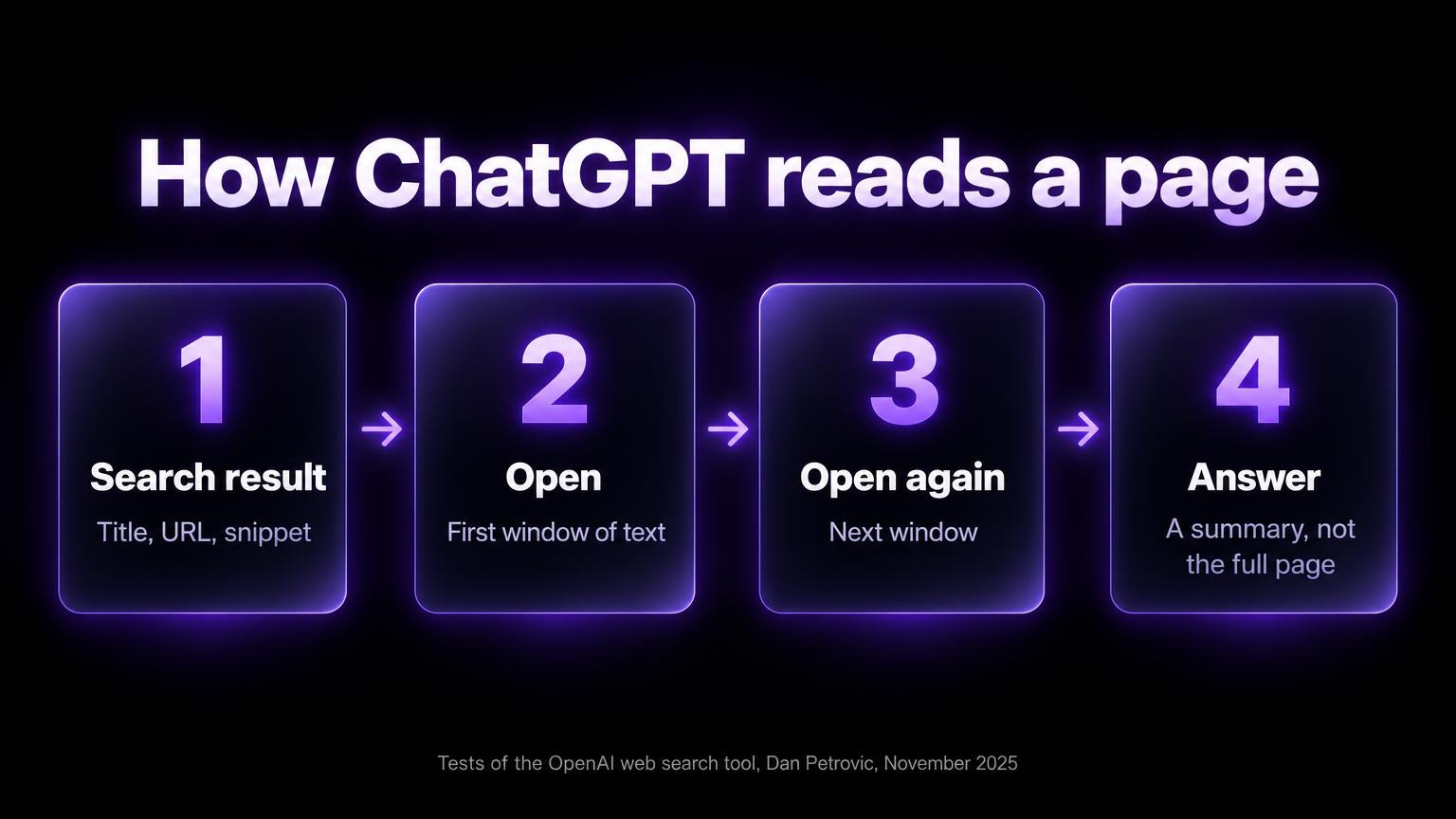
What a search result gave the model:
- A title
- A URL
- A snippet of one to three sentences
- An internal ID
What it didn't get: the full page, the raw HTML, the site navigation.
To read more, the model opened the page in fixed-size windows of text. It could open again for the next window.
Even after several windows, it couldn't reproduce the whole page. So it had to summarise.
One caveat. These are tests of an API tool. ChatGPT itself may differ.
The advice still holds:
- Put the answer early.
- State it in plain text.
- Write a title, a description and headings that say what each part answers.
What Is Known About JavaScript and ChatGPT
The question site owners ask most: does ChatGPT run JavaScript?
Three sources. They don't agree.
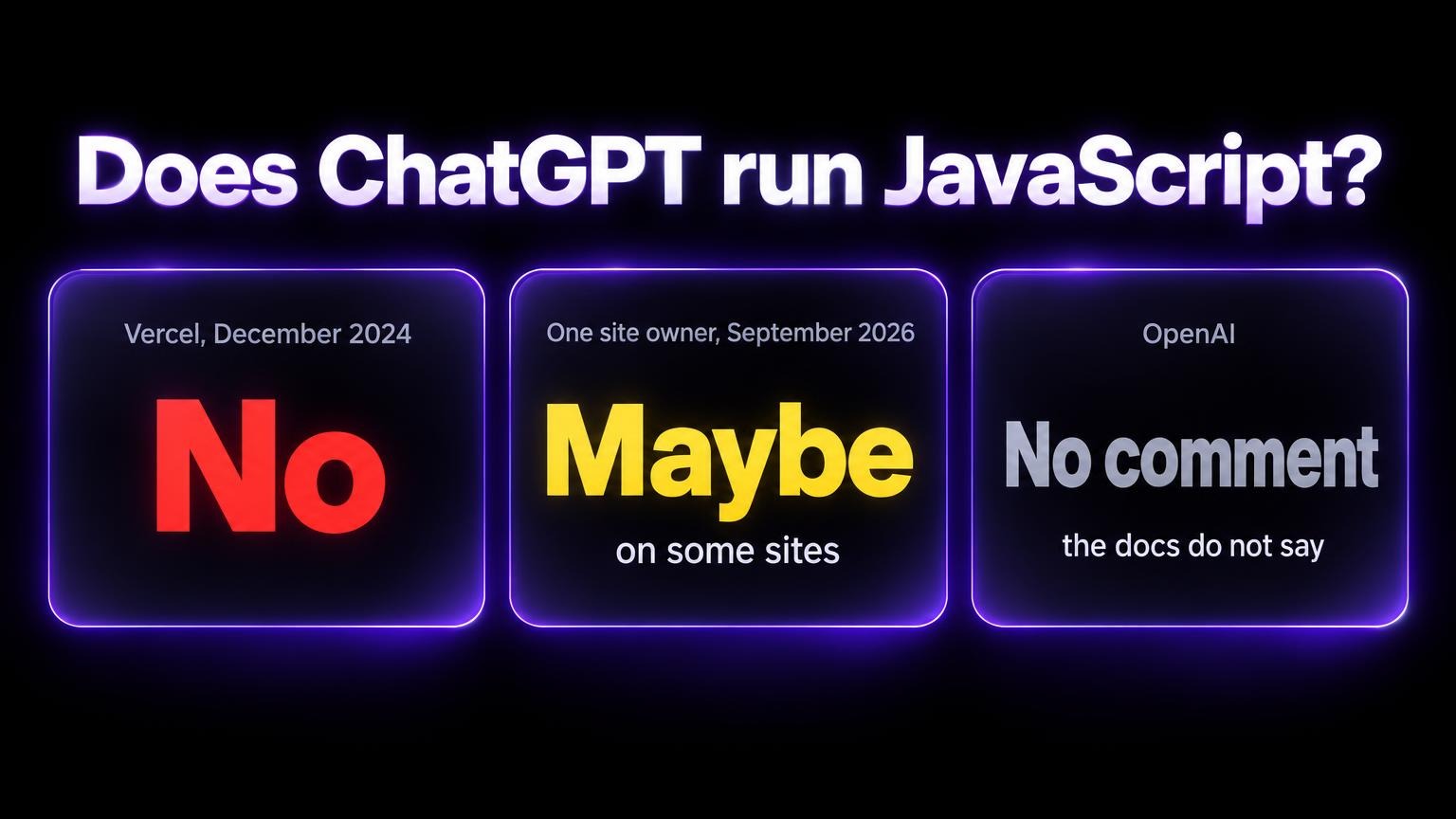
Vercel, December 2024: no.
Vercel and MERJ measured AI crawler traffic on Vercel's network. They reported on 17 December 2024 that none of the major AI crawlers rendered JavaScript. That included OpenAI's OAI-SearchBot, ChatGPT-User and GPTBot.
ChatGPT's crawler requested JavaScript files in 11.5% of its requests. But it didn't run them.
(Content already in the initial HTML, like JSON data, could still be read.)
One site owner, 30 September 2026: maybe.
A developer published server logs that suggest OpenAI's search and training bots began running JavaScript on 25 September 2026.
- The author checked each request against OpenAI's published IP ranges.
- The sign: Next.js prefetch requests with a
?_rsc=parameter. Those appear only when a page's scripts run. - The author found no announcement from OpenAI.
- Cloudflare Radar showed OpenAI's share of AI bot traffic flat through September. So the author thinks rendering is on for only some sites.
OpenAI: silent.
The crawler documentation doesn't mention JavaScript or rendering.
Treat the 2026 report as unconfirmed. It's one source.
The safe rule doesn't change: put the answer in the HTML your server sends.
A bot that renders reads it. A bot that doesn't render still gets it.
Five Checks to Run on Any Page
Run them in order.
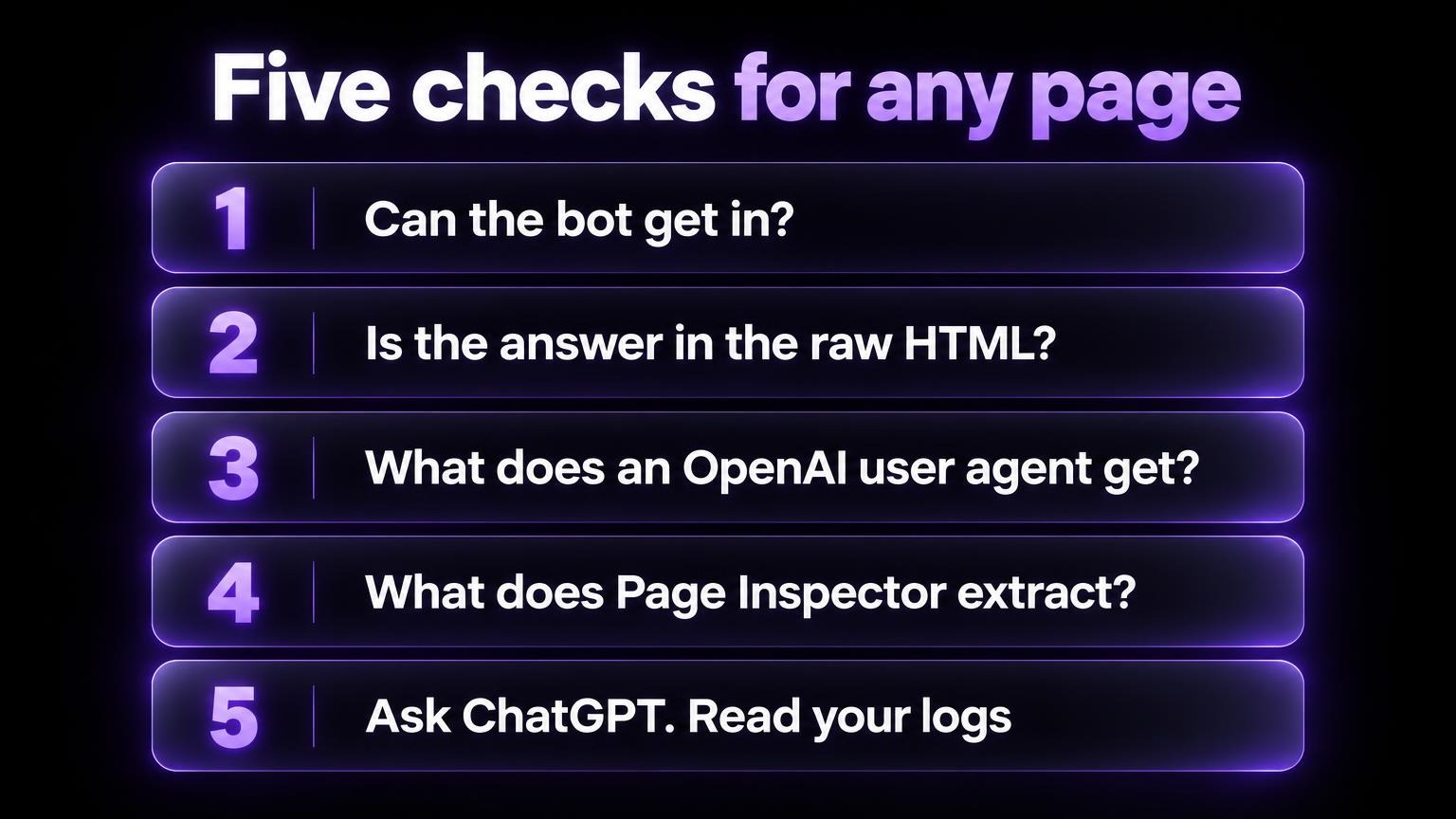
Set the user agent once. OpenAI publishes the string and says the version number may change.
UA="Mozilla/5.0 (Macintosh; Intel Mac OS X 10_15_7) AppleWebKit/537.36 (KHTML, like Gecko) Chrome/131.0.0.0 Safari/537.36; compatible; OAI-SearchBot/1.4; +https://openai.com/searchbot"
Check 1 Can the Bot Get In
Open yourdomain.com/robots.txt.
Look for a Disallow rule that covers your page. Under User-agent: OAI-SearchBot, or under User-agent: *.
Then ask your server for the page with the bot's name.
curl -sL -o /dev/null -w "%{http_code}\n" -A "$UA" https://yourdomain.com/pricing
Expect 200.
A 403 or a challenge page? A firewall or bot rule sits between the bot and your page.
OpenAI recommends that you allow OAI-SearchBot in robots.txt, and allow requests from its published IP ranges.
A robots.txt change can take about 24 hours to reach OpenAI's search systems.
Check 2 Is the Answer in the Raw HTML
Raw HTML is what your server sends before any script runs.
Open the page. Choose "View page source". (Not Inspect. Inspect shows the page after scripts ran.) Search for a price, or a sentence from the answer.
Or use the terminal.
curl -sL https://yourdomain.com/pricing | grep -o -i ".\{0,60\}your phrase.\{0,60\}"
No output? The phrase isn't in the HTML your server sends.
Text inside embedded JSON shows up here too. Vercel's data says content like that could still be read.
Check 3 What Does an OpenAI User Agent Receive
Request the page twice. Once with curl's default name. Once with the bot's name.
Compare the status, the type and the size.
curl -sL -o /dev/null -w "%{http_code} %{content_type} %{size_download}\n" https://yourdomain.com/pricing
curl -sL -o /dev/null -w "%{http_code} %{content_type} %{size_download}\n" -A "$UA" https://yourdomain.com/pricing
The type or the size differs? Then the site serves bots something else.
Read it with curl -sL -A "$UA" https://yourdomain.com/pricing | head -40.
One limit. This test sends the bot's name from your address. Not OpenAI's. A site can treat OpenAI's real addresses differently.
Check 4 What the AI Page Inspector Extracts
The AI Page Inspector takes a public URL. It shows the clean text it can extract: title, description, headings and copy.
Then it asks a question that fits the page. A pricing question for a pricing page. A feature question for a product page. And answers it from that text.
How to use it:
- Read the extract.
- Read the issues it flags.
- Ask your own question. "What are the pricing tiers?" or "What features are included?"
It can't answer? The page has a gap.
(This is the same tool we used to analyze Loops.so.)
Know its limits.
- The Inspector uses a browser-based reader. So scripts can run before it extracts the text.
- It converts the page to Markdown. It removes images, video, iframes and links.
- It's not a log of what OpenAI's bots fetched.
So it's a good test for missing answers, weak copy, and content that needs a click or a drag.
But text that a script adds can look fine in the extract, and still be missing for a bot that doesn't run scripts. And it can't see a page that a site serves only to bot user agents.
Checks 2 and 3 cover those gaps.
Check 5 Ask ChatGPT and Read Your Logs
Ask ChatGPT. With search on. What does your pricing page say for each plan?
Compare the answer to your page. Read the sources it lists.
One answer is one sample. Ask a few times.
Then search your logs for the three user-agent names.
grep -E "OAI-SearchBot|GPTBot|ChatGPT-User" access.log
Anyone can send those names. So check each client address against OpenAI's lists: OAI-SearchBot, GPTBot and ChatGPT-User.
A verified visit shows that a bot fetched the page. It doesn't show that ChatGPT used the page in an answer.
For clicks: OpenAI says ChatGPT adds utm_source=chatgpt.com to the referral links in its search results. Those visits show in analytics with that source. (OpenAI publisher FAQ.)
What Each Check Cannot Tell You
No single check shows what ChatGPT read.
Each answers one question and misses another. So pair two that fail in different ways. Like check 3 and your logs.
| Check | It answers | It cannot tell you |
|---|---|---|
| Status as the bot | Whether a request with the bot's name gets through | Whether a firewall that verifies IP addresses treats the real crawler differently |
| Raw HTML | Whether the text is in what your server sends | Whether bots get a different page by user agent |
| User-agent diff | What a request with an OpenAI user agent receives | What the real crawler receives from OpenAI's addresses |
| AI Page Inspector | What a browser-based reader extracts, and what an AI can answer from it | What OpenAI's bots fetched. It can hide a no-JavaScript gap and does not see bot-only pages |
| Ask ChatGPT | Whether ChatGPT used your page in this answer | Why. One answer is one sample |
| Logs | Whether a verified bot visited, and the status and size it got | Anything about pages no bot has visited yet |
A Worked Example With the Loops Pricing Page
Loops is an email tool with a pricing slider. You pick a subscriber count. The plan changes.
The gap is easy to see there. And it's not rare.
As of October 2025, we had run the AI Page Inspector on 50+ SaaS landing pages. 47 of them had critical content missing from the extract.
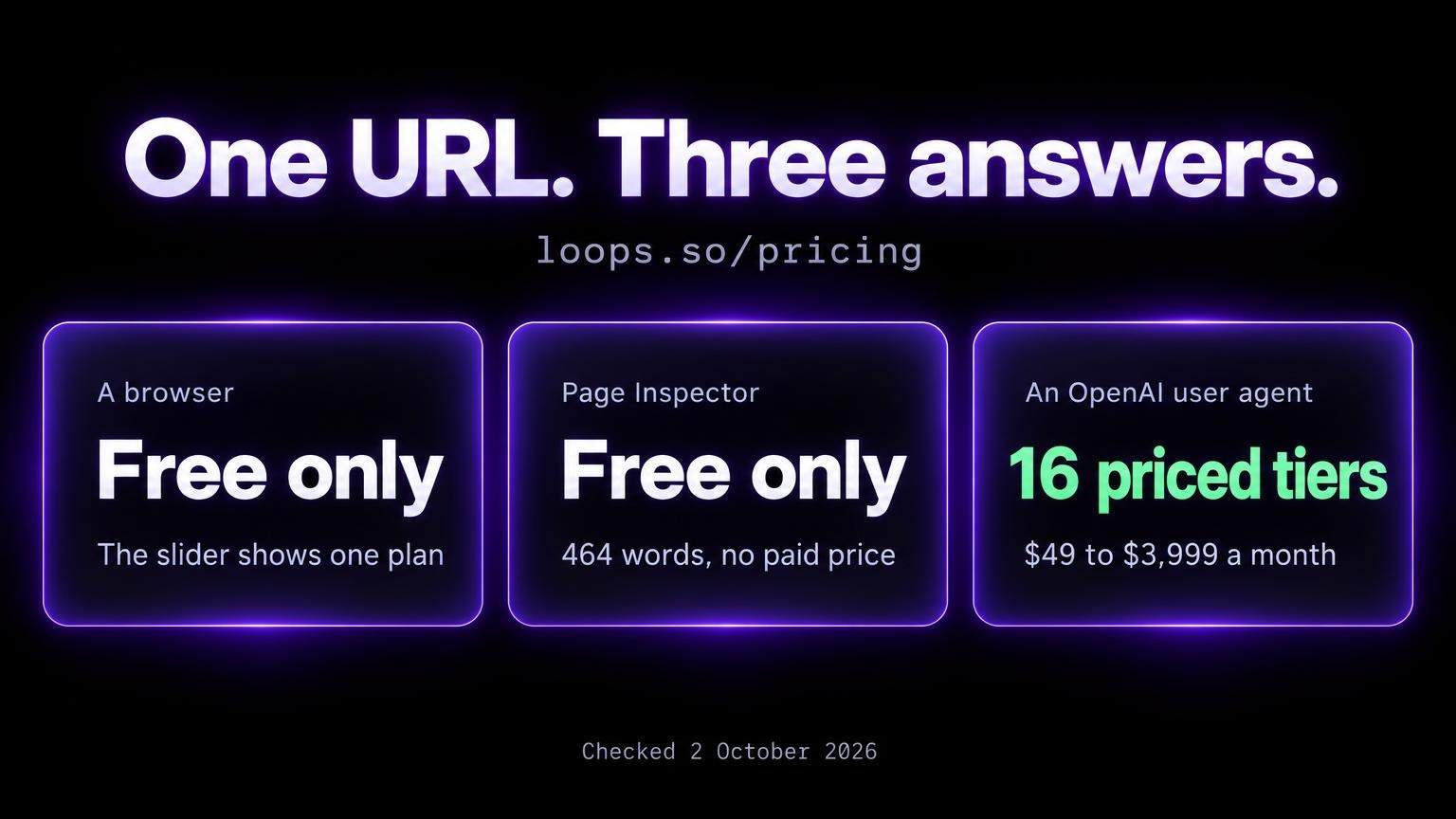
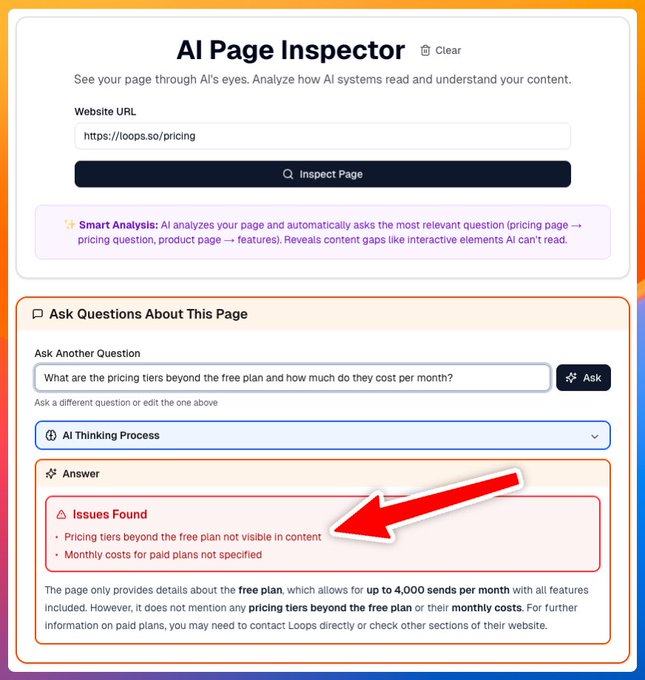
What a person sees. Drag the slider. The plan changes.
What the Inspector extracts. Only the Free plan.
The tool asked about the pricing tiers. It flagged that tiers beyond the free plan aren't visible in the content.
A new run on 2 October 2026 gives the same result. 464 words of text. The Free plan. No paid price.
The Internet Archive copy from 15 October 2025 reads the same: "Your plan Free". No paid price in the text.
What an OpenAI user agent gets. A different answer.
Check 3 on the same URL, run on 2 October 2026:
| Request to loops.so/pricing | What came back | Prices in the text |
|---|---|---|
| Browser or default curl name | HTML, 515,374 bytes, about 565 words of visible text | None. Free only |
| OAI-SearchBot name | A Markdown document as text/plain, 4,486 bytes | 16 priced tiers, $49 to $3,999 a month, plus Free and Enterprise (custom) |
| GPTBot or ChatGPT-User name | The same 4,486 bytes | The same |
| Browser name with Accept text/markdown | Markdown, 3,902 bytes | None. A Markdown copy of the slider page: Free only |
| AI Page Inspector | 464 words of Markdown | None. Free only |
So one URL gives:
- A person: a slider.
- A browser-based reader: the Free plan.
- An OpenAI user agent: every tier, as text.
That's a fix of the kind described below. People keep the slider. Bots get the full list.
The Markdown row is the trap. A Markdown copy of the slider page repeats the gap. The Markdown has to contain the tiers.
Two limits:
- The test sends the bot's name from a non-OpenAI address. So it doesn't show what OpenAI's crawler received.
- It doesn't show what ChatGPT answers about Loops today.
HubSpot goes the other way.
Same method, on HubSpot's marketing pricing page.
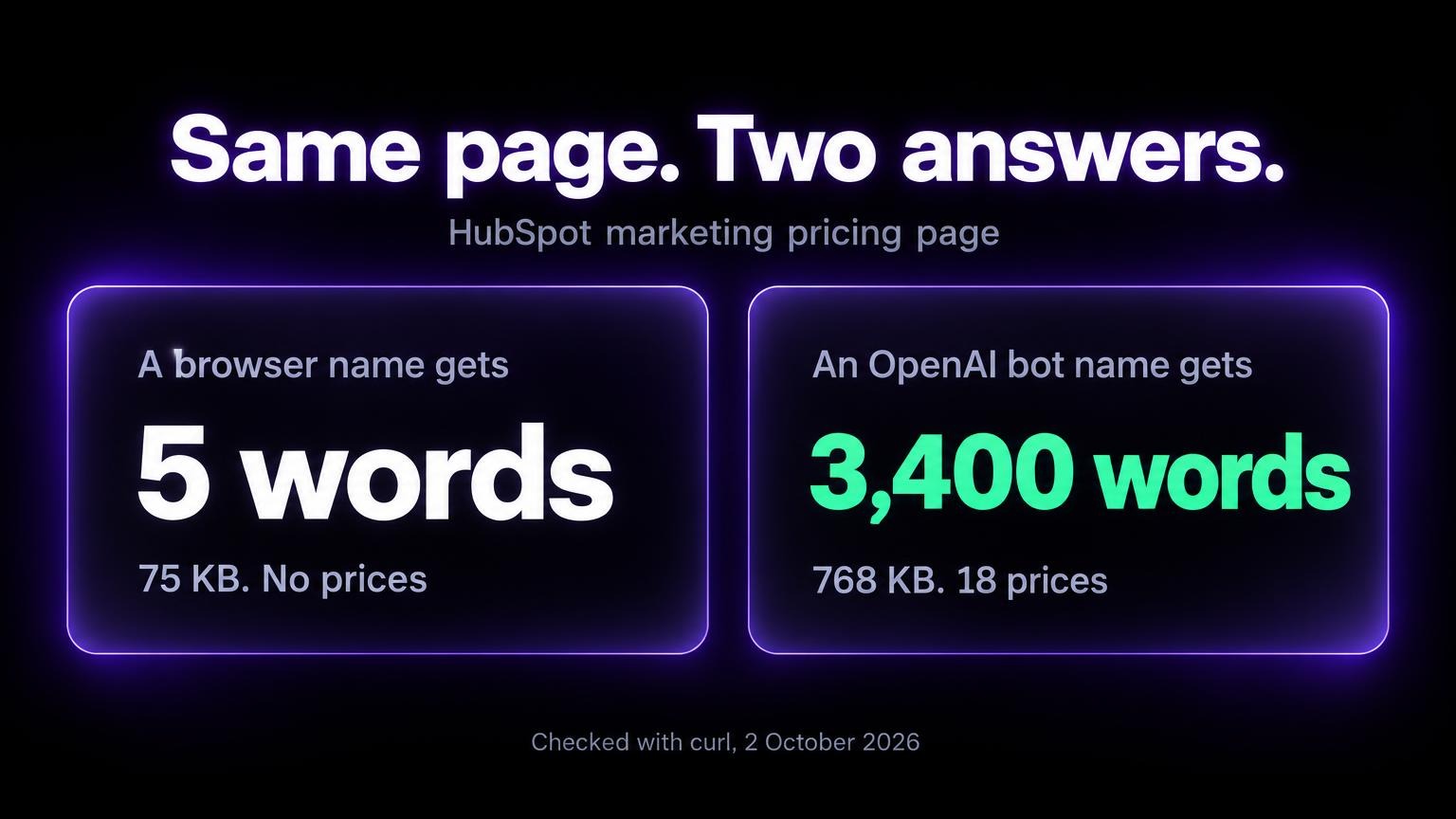
- A browser or curl name: 75 KB of HTML. About five words of text. A JavaScript app shell with no prices.
- The OAI-SearchBot, GPTBot and ChatGPT-User names: 768 KB. About 3,400 words of visible text. 18 dollar amounts.
A bot that doesn't run scripts could read prices only in the second response.
And a third party shows what happens if you don't fix it.
Encharge, a rival email tool, published a Loops review. It lists every Loops tier in a text table. And scores Loops 3.8 out of 5. (Archived copy, 21 May 2026.)
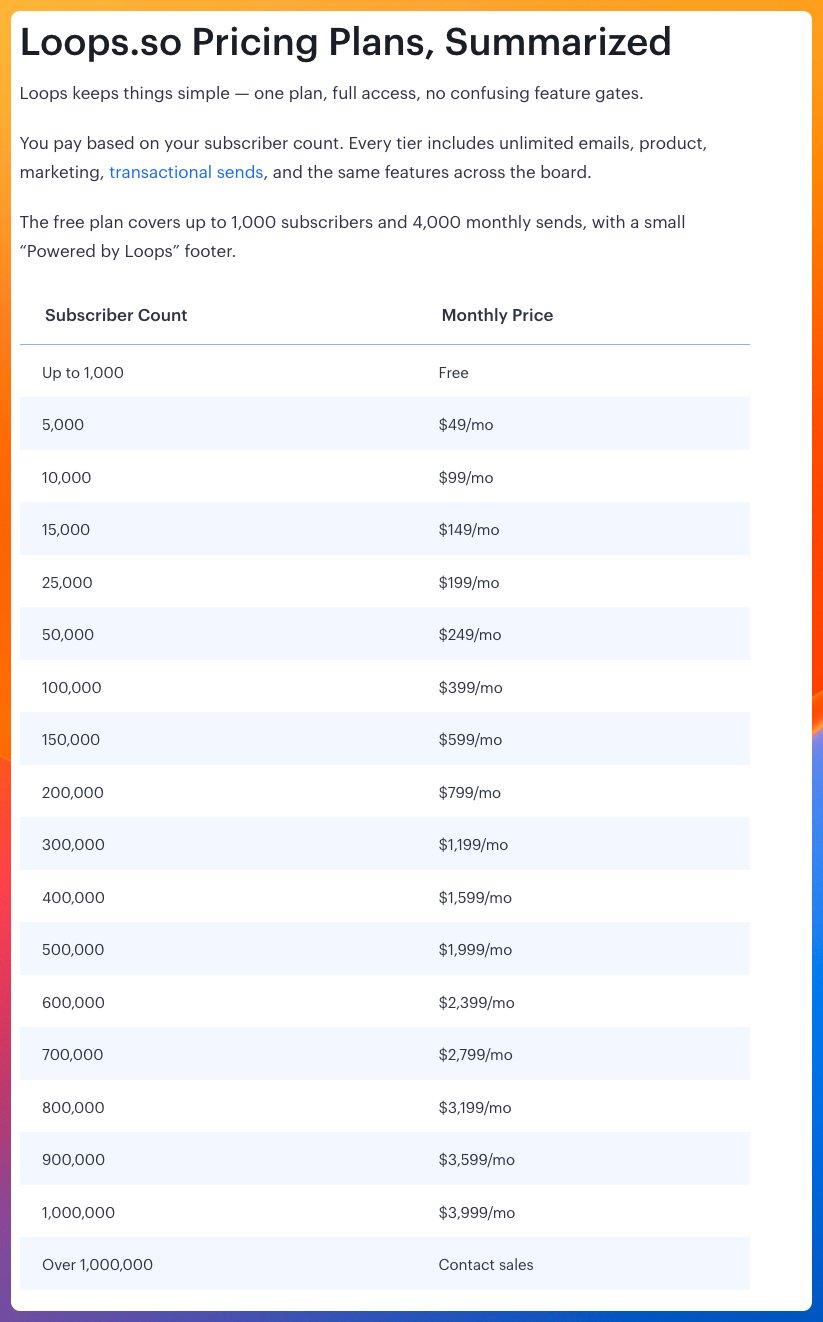
When your own page doesn't state the answer in text, a page that does is the one a reader or a bot can quote.
Even if it's your competitor's.

Does AI name you?
See if AI mentions your brand. Then get the pages to fix.
How to Fix a Page ChatGPT Cannot Read
Fix the cause in this order.
The first fix helps every reader and every bot. The last carries the most risk.
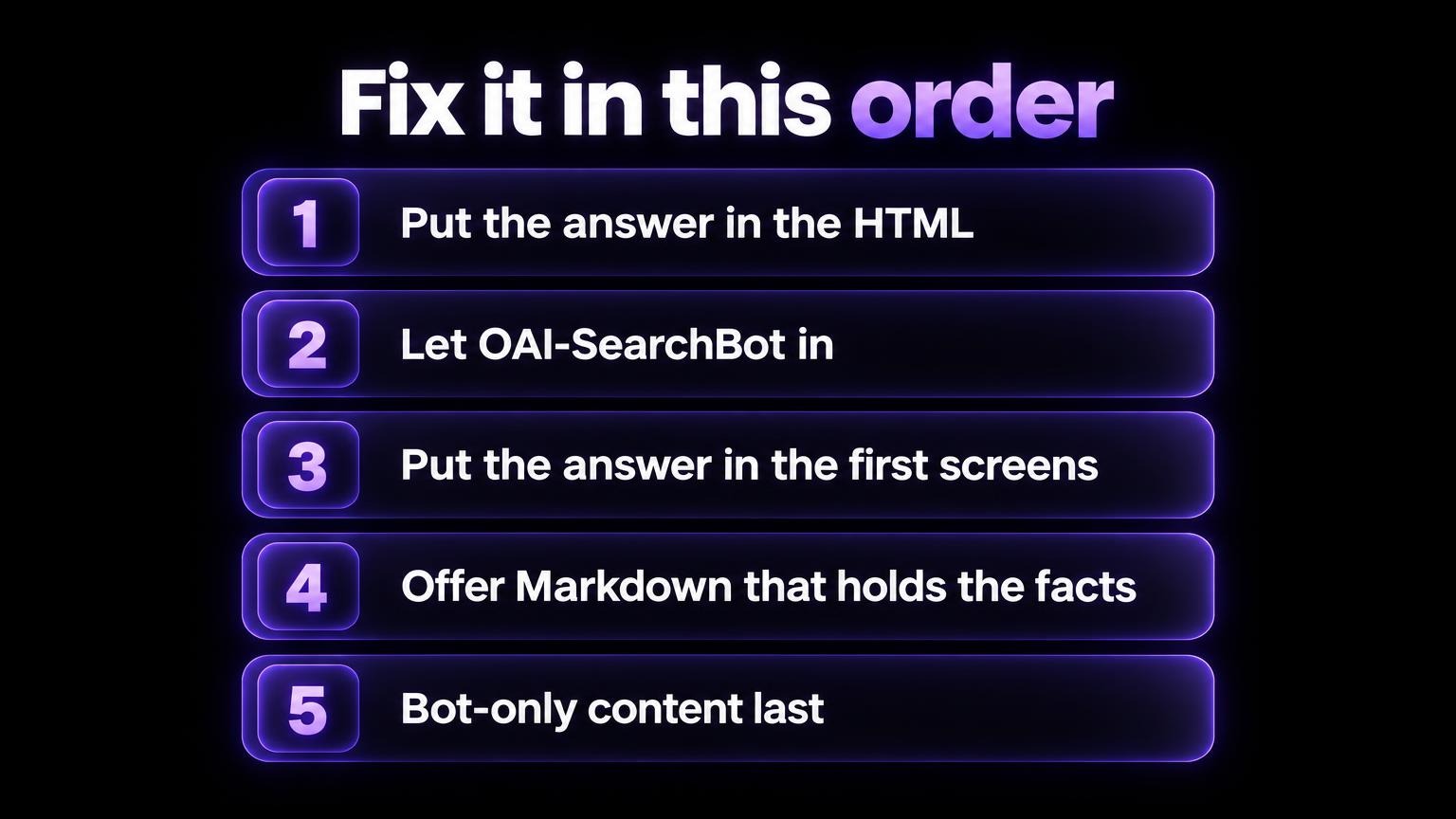
1. Put the answer in the HTML your server sends. Show it to everyone.
- Render the page on the server, or generate it ahead of time.
- Add a plain table of every tier under the slider.
- Put every tab panel in the HTML.
Vercel gives the same advice: server-side rendering, incremental static regeneration and static generation keep content available to all crawlers. (Vercel.)
2. Let OAI-SearchBot in.
Allow it in robots.txt and in your firewall. Allow OpenAI's published IP ranges.
GPTBot is a separate choice about training.
3. Put the answer in the first screens.
Use specific headings. And a title and description that say what the page answers.
4. Offer Markdown that holds the facts.
Serve a Markdown copy on request. Through content negotiation, or a .md URL. Markdown for agents shows how.
5. Use bot-only content last.
The LLMOnly component shows text only when the user agent matches. So it misses any agent it doesn't know.
Give bots the same facts the page shows people.
Google's spam policy defines cloaking as showing users and search engines different content to manipulate rankings and mislead users. It names text added only for a search engine as an example.
It covers search engines, not AI bots. Take it as a caution. Not a ruling.
Fix 2 in robots.txt:
User-agent: OAI-SearchBot
Allow: /
Fix 1 in code, for a slider:
// Before: a slider only. A text reader gets one state.
<PricingSlider onChange={updatePrice} />

// After: the slider for people, and every tier as text for everyone.
<PricingSlider onChange={updatePrice} />
<table>
  <tr><td>Starter, 1,000 contacts</td><td>$29 a month</td></tr>
  <tr><td>Pro, 10,000 contacts</td><td>$99 a month</td></tr>
</table>
| What your page does | What a text reader gets | Fix |
|---|---|---|
| Price slider | One state at a time: the default, here Free | List every tier in text |
| Tabs or accordions | It depends: panels in the HTML are readable, panels loaded on click are not. Check view-source | Render every panel in the HTML |
| Variant selector that loads details by script | The default variant | List every variant in text |
| Client-rendered shell | Almost no text, as with HubSpot's response to a browser name | Server render or prerender |
Being Readable Is Not the Same as Being Named
A page that bots can read is a condition for being named in an answer.
It's not a rank.
Our leaderboard scanned "best email marketing platform" on 24 September 2026. Four engines named 14 products. Klaviyo had the best average rank: 2.7.
Loops and Encharge aren't among the 14. (Leaderboard.)
(The question is generic. So it says nothing about why.)
The five checks tell you if ChatGPT can read your page.
They don't tell you if ChatGPT names your brand.
That needs the same questions run again and again, with the answers logged. See how to monitor if ChatGPT mentions your brand and how to measure brand visibility in AI.
AI SEO Tracker automates it. $49, once. Up to 50 prompts on five engines, daily for 7 days.
What gets a brand named: how to rank in ChatGPT.
Questions About ChatGPT and Your Website
Can ChatGPT read my website
Yes.
OpenAI says ChatGPT may visit a page with the ChatGPT-User agent when a user asks a question. And OAI-SearchBot surfaces sites in ChatGPT search results.
Whether it gets your text depends on checks 1 to 3.
Does blocking GPTBot remove my site from ChatGPT
No. OpenAI says each setting is independent.
- GPTBot: use for training.
- OAI-SearchBot: decides if your pages show in ChatGPT search answers.
- ChatGPT-User: visits when a user asks. OpenAI says robots.txt rules may not apply to it.
Does ChatGPT run my JavaScript
OpenAI's crawler page doesn't say.
Vercel's December 2024 data says no. One site owner's logs suggest it may have started on some sites on 25 September 2026.
If the answer is in your HTML, the question doesn't matter. See what is known.
Does ChatGPT read my whole page
In tests of OpenAI's web search tool: no. The model opened capped windows of text and had to summarise.
Put the answer early.
How can I see which pages ChatGPT visits
Read your logs for OAI-SearchBot, GPTBot and ChatGPT-User. Check the addresses against OpenAI's lists.
Visits from ChatGPT search results carry utm_source=chatgpt.com.
Which pages ChatGPT cites when it answers about your brand is a different question. Run the questions and read the sources. By hand, or with a tracker.
Is the AI Page Inspector the same as what ChatGPT sees
No.
It shows what a browser-based reader extracts from your page. And what an AI can answer from that text.
It's not OpenAI's fetch. Use it with checks 2 and 3.